

The CraftKeep add‑on for Windows
An optional add-on for your CraftKeep library. Everything works in your web browser as it always has; the add-on is for the jobs that are easier on a computer.
Free on every plan
For Windows 10 or 11, 64-bit. One installer sets everything up and adds CraftKeep to your Start menu, and from then on CraftKeep keeps itself up to date. See the Mac version and what the add-on does.
- Import a library
- Faster uploads
- Set up a USB drive for your machine
- Load designs onto the drive
- Keeps itself up to date
- Drag and drop
- Import a library from a folder or a .zip
- Print and Save for contact sheets
- Group Live
- Share your screen
- New from Downloads
Version 1.3.0 · Installer, 4.6 MB
Set it up, step by step
These are the real screens Windows 11 shows. What to click is circled in red. Windows 10 looks a little different but asks the same questions.
Step 1: Download the installer
Choose Download for Windows above. Your browser saves CraftKeep-Setup-1.3.0.exe in your Downloads folder.
If your browser asks whether to keep the file, choose Keep. Browsers ask this about new apps they haven't seen many people download yet.
Step 2: Open it
Open your Downloads folder (press the Windows key and E together, then choose Downloads) and double-click CraftKeep-Setup-1.3.0.exe.
Step 3: If Windows says “Windows protected your PC”
Windows shows this blue screen the first time you open an app it doesn't know yet. Choose More info.
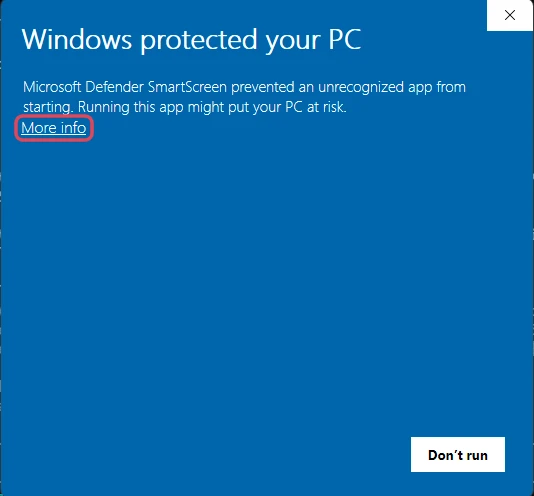
The screen then names the app. Check that it says App: CraftKeep-Setup-1.3.0.exe, then choose Run anyway. Windows only asks this once.
Why it says “Unknown publisher”: Windows shows this for apps downloaded from a website that it hasn't seen many times before.
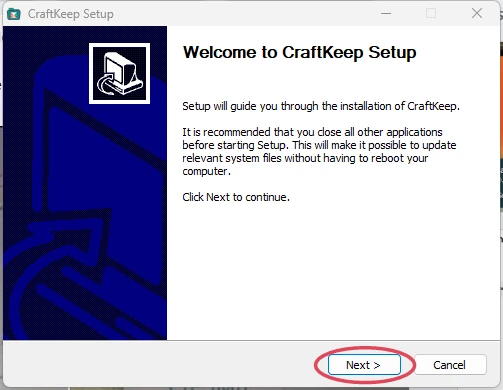
Step 4: Install
The CraftKeep installer opens. Choose Next and follow its steps: the choices it offers are already right. It installs CraftKeep just for you, so Windows doesn't ask for an administrator password.
Step 5: Sign in
CraftKeep opens with its welcome screen for a few seconds, then your library. Sign in with your usual CraftKeep email and password. The app remembers you next time, and you'll find CraftKeep in your Start menu.
When you set up a USB drive
Setting up a drive erases it, so Windows asks your permission every time. When you choose Format in CraftKeep, the screen dims and Windows asks about craftkeep-drive-helper.exe. Choose Yes.
Do you want to allow this app from an unknown publisher to make changes to your device?
craftkeep-drive-helper.exe
Publisher: Unknown
File origin: Hard drive on this computer
Show more details
CraftKeep only ever sets up the USB drive you picked. It refuses your computer's own drives. How USB set-up works
Updates
New versions arrive by themselves. When one is ready, CraftKeep asks: choose Restart to update, or Later to carry on and be asked again. It waits until an import or a USB drive job has finished. To check yourself, choose Help, then Check for updates.
Removing it
Open Settings, then Apps, then Installed apps. Find CraftKeep, choose the three dots next to it, then Uninstall. Your designs stay safe in your CraftKeep library, and you can keep using it in your web browser.
Questions
Is it safe?
Yes. It's the same CraftKeep you use in your browser, in its own window, made by the CraftKeep team. It encrypts each design on your computer before sending it, keeps no copy of your library on your computer, and only opens the folders and USB drives you choose. Every update is checked against CraftKeep's signature before it installs. Privacy policy
Windows says it can't run this app and there's no Run anyway button
Some Windows 11 computers have Smart App Control turned on, which only allows apps signed with a paid certificate. On those computers, use CraftKeep in your web browser instead: it has your whole library, and Add files takes designs and ZIPs. Work and school computers can block new apps too: ask whoever looks after the computer.
Does it cost anything?
No. The add-on is included with every CraftKeep plan, including Free. Imports count toward your plan's storage, the same as adding designs in your web browser.
What do I need?
A 64-bit Windows 10 or Windows 11 computer with an internet connection. It uses the Microsoft Edge engine that comes with Windows; if your computer doesn't have it, the installer adds it.
What about a Mac?
There's a Mac add-on too, checked by Apple, with its own step-by-step guide. The Mac add-on
How can I check the download is genuine?
Its SHA-256 fingerprint is 5bd33f6fd88e027a11dffa905182c954f2bc4063eaf3e0ed347bf84b5f2a9390. To see the fingerprint of the file you downloaded, open PowerShell and type: Get-FileHash $HOME\Downloads\CraftKeep-Setup-1.3.0.exe. The two should match.
Your whole embroidery library, organized.
See every design as a picture and find it in seconds.
No credit card needed